If you’ve spent any time at an HPDE event over the last few years, you’ve probably seen a Garmin Catalyst sitting on someone’s windshield. It has become one of the most popular driver coaching tools because it doesn’t just record lap times—it actually teaches you how to drive faster.
Recently, I had the opportunity to use both the original Garmin Catalyst and the new Garmin Catalyst Gen 2 back-to-back. After several track days with the original unit and an entire weekend at Watkins Glen using the Gen 2, I came away impressed… and also a little conflicted.
Here’s my real-world experience.
Garmin Catalyst Gen 1
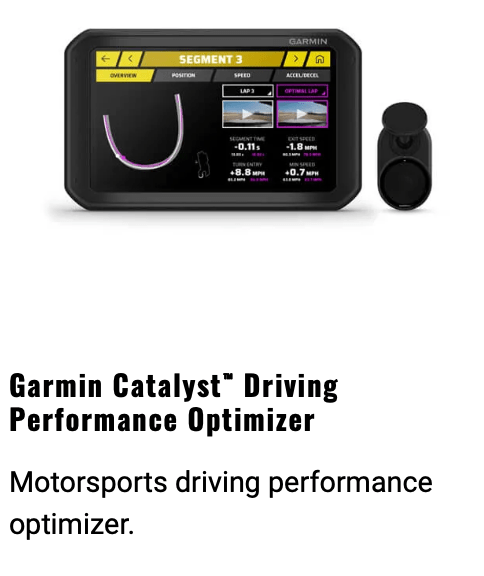
The original Garmin Catalyst is built around a removable tablet-style display connected to a separate windshield-mounted camera.
Installation isn’t difficult, but it does require some effort. You’ll need to:
• Mount the display.
• Mount the forward-facing camera.
• Route the camera cable.
• Provide power to the display.
• Position everything so the camera is centered on the windshield.
Once installed, though, it’s incredibly capable.
What I Love
The coaching remains one of the best features available in any standalone driver aid.
Rather than comparing you to another driver, the Catalyst compares every segment of the track against your own best performance. It learns where you’ve braked the latest, carried the most speed, or found the best racing line, then coaches you toward repeating those improvements.
During a session you’ll hear prompts like:
• Brake later
• Brake earlier
• Turn in sooner
• Apex later
After only a lap or two, it essentially becomes your personal driving coach.
The post-session analysis is equally impressive.
You can export:
• Your best lap
• Your optimal lap
• Your entire driving session
Even better, every exported video includes Garmin’s excellent overlay showing:
• Speed
• G-forces
• Current lap
• Previous lap
• Best lap comparison
• Track map
• Segment information
For anyone who enjoys reviewing data—or posting laps on YouTube—this is fantastic.
I also really like the removable tablet. You can pull it out of the car, review sessions in the paddock, or hand it to another driver.
Where the Gen 1 Frustrates Me
Unfortunately, I’ve had three recurring issues.
1. It Doesn’t Always Power On
Sometimes it starts with the car.
Sometimes it doesn’t.
Occasionally I’d have to hold the power button for 10 seconds before it finally booted.
Not the end of the world—but annoying when you’re already heading to grid.
2. GPS Acquisition Is Inconsistent
This was my biggest frustration.
Eight out of ten sessions?
Perfect.
Then seemingly under identical conditions—with the exact same mounting location and a completely open sky—it simply wouldn’t lock onto satellites.
That meant arriving at grid 5–10 minutes early just to make sure GPS was ready before the session started.
3. Random Video Signal Loss
Every so often I’d lose the camera feed.
The wiring was new.
Nothing was pinched.
There wasn’t any obvious cause.
Again, it wasn’t constant—but it happened often enough to become frustrating.
Garmin Catalyst Gen 2
When Garmin announced the second generation, my first reaction wasn’t excitement.
Honestly…
I was worried.
The tablet was gone.
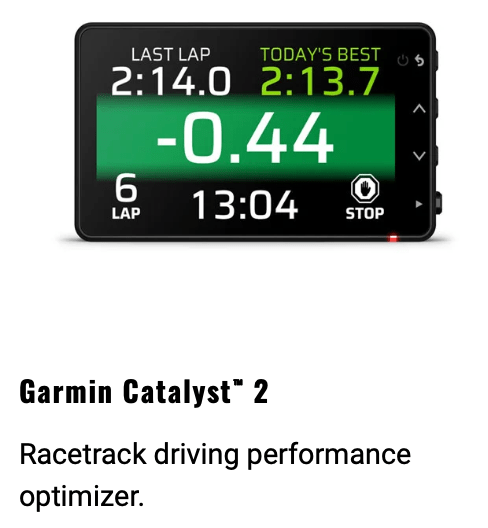
Instead, Garmin moved to a compact all-in-one dashcam-style design.
I immediately assumed this would be a downgrade.
Then I actually used it.
Installation Is Much Simpler
Instead of mounting a display, camera, and cable separately, everything is integrated into one compact unit.
I chose to mount mine using the included GoPro-style mounting adapter attached to a permanent windshield mount instead of the magnetic mount.
The result was:
• Faster installation
• Fewer wires
• Less clutter
• A more secure mount
This alone makes Gen 2 much easier to live with.
What Garmin Absolutely Fixed
Instant Startup
Every single session…
It turned on immediately.
No waiting.
No holding power buttons.
No wondering if it would boot.
That alone was refreshing.
Excellent GPS Acquisition
This may be the biggest improvement.
Satellite lock was nearly instantaneous.
Even sitting inside my garage, signal strength was excellent.
At Watkins Glen it already knew what track I was at.
All I had to do was confirm the layout.
Compared to Gen 1, this felt like a huge improvement.
No Video Signal Problems
Because everything is contained in one unit, there’s no external camera cable to fail.
Across every session I ran, I never lost video.
But Gen 2 Introduced New Frustrations
Unfortunately, Garmin solved some problems while creating others.
Wi-Fi Sync Isn’t Automatic
I expected the unit to automatically upload sessions whenever it connected to Wi-Fi.
Instead, it wants to connect directly to your phone.
That became frustrating because my Camaro uses Apple CarPlay.
CarPlay relies on both Bluetooth and Wi-Fi, and it doesn’t like sharing those connections.
To sync the Catalyst, I often had to disconnect CarPlay or reconnect everything with the car turned off.
It’s not impossible—but it’s definitely less convenient than I expected.
Exporting Video Is Much More Limited
This was my biggest disappointment.
With Gen 1 I could export an entire session complete with Garmin’s overlay.
With Gen 2…
I couldn’t.
The unit stores raw video in one-minute clips on the SD card.
The Garmin app lets you export highlighted laps like your best or optimal lap with overlays, but I couldn’t find a way to export an entire session with the same overlay.
For someone who creates track videos and shares complete sessions online, that’s a major step backward.
Voice Coaching Is Better
One thing I wasn’t expecting…
The coach sounds much more natural.
The Gen 1 voice always felt fairly robotic.
Gen 2 sounds noticeably smoother and easier to listen to during a session.
It’s a small improvement, but one I appreciated.
What I’d Still Love to See
Both Catalysts are excellent coaching tools.
But I’d love Garmin to go one step further.
Imagine integrating vehicle telemetry.
Even basic OBD-II data like:
• RPM
• Throttle position
• Engine temperature
would add another level of analysis.
Even better would be full CAN Bus support like professional motorsports systems provide:
• Gear position
• Brake pressure
• Throttle position
• Steering angle
• Vehicle telemetry
Many modern performance cars already record this information internally. Combining Garmin’s coaching with that data would make the Catalyst incredibly powerful.
Which One Would I Buy?
If your goal is simple driver coaching with easier installation and rock-solid GPS reliability, the Garmin Catalyst Gen 2 is probably the better choice.
However…
If you regularly produce YouTube videos, analyze complete sessions, or enjoy exporting full overlay videos, the original Garmin Catalyst still offers capabilities that I genuinely miss.
In many ways, Gen 2 feels like two steps forward and one step back.
Garmin fixed nearly every hardware complaint I had:
• Faster startup
• Better GPS
• Cleaner installation
• No camera cable failures
• Better voice coaching
But they also removed one of my favorite features: exporting an entire session with Garmin’s excellent data overlay.
For me, that’s enough to make this decision surprisingly difficult.
Final Verdict
If you’re buying a Catalyst strictly to become a faster driver, the Gen 2 is an excellent piece of hardware.
If you’re also a content creator or someone who enjoys reviewing complete sessions after every track day, don’t overlook what the original Garmin Catalyst still does exceptionally well.
Hopefully a future software update combines the best of both generations—because then Garmin would have an almost perfect HPDE coaching tool.

